Security update: The recent PHP vulnerabilities don’t affect us. None of our products or infrastructure use PHP. We’ve also reviewed our app after the recent Shopify checkout phishing attack and ran Shopify’s new security check. No issues were found.


Omnibus · EU 30-day price rule

Show the lowest prior price, on every sale.

Complimus saves the price of every variant every day, in every Shopify market. When you put a product on sale, it shows the lowest price from the 30 days before the sale next to the sale price. That is the "prior price" the EU Omnibus Directive asks for.

  • Save every variant's price, daily
  • Set your own rule per country, Poland included
  • Choose which discount codes count
  • Fix non-compliant compare-at prices in bulk

Free for stores with up to 100 products. Unlimited on Business and Plus.

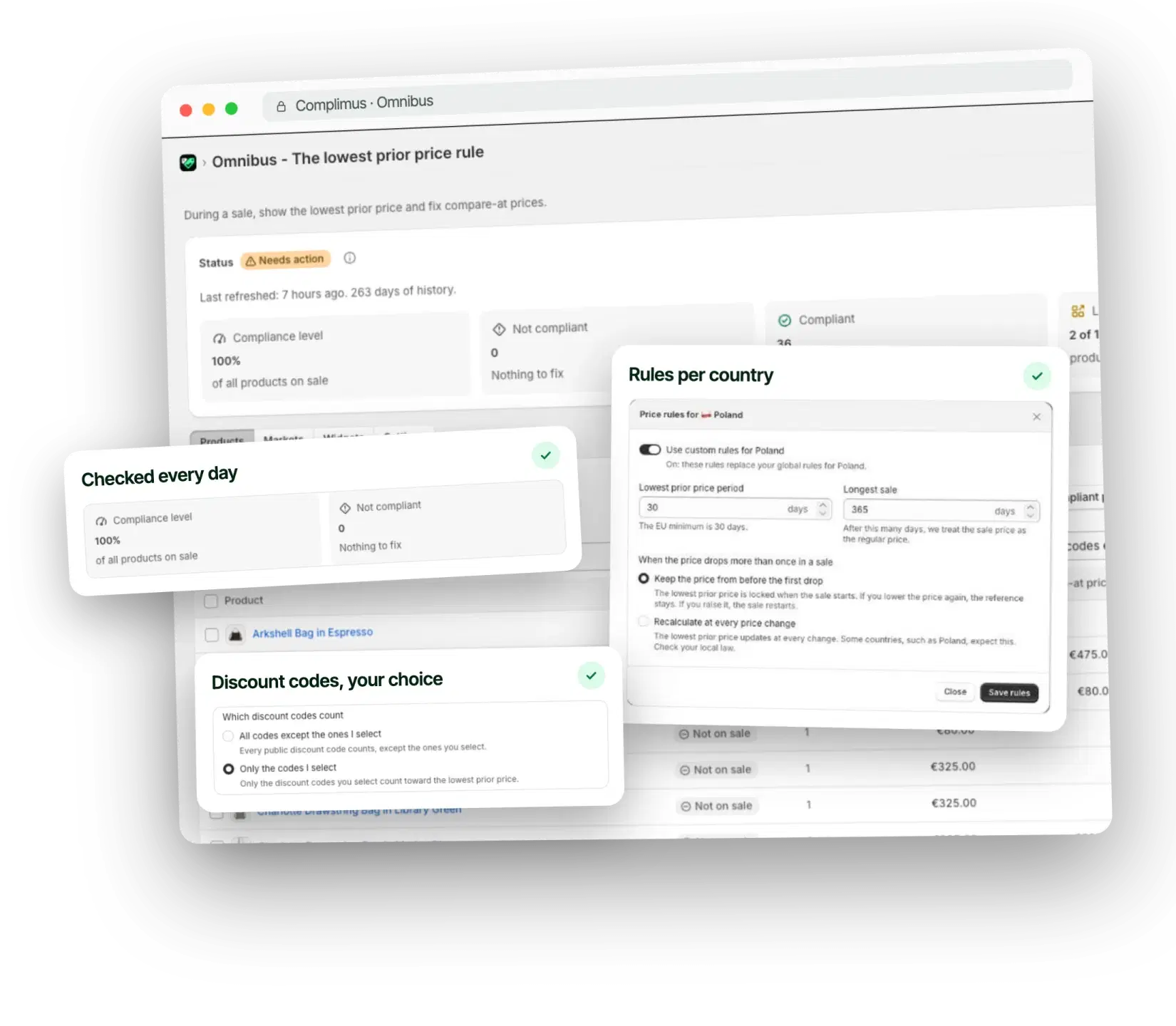
Complimus Omnibus admin: compliance checked every day, price rules per country and a choice of which discount codes count

At a glance

Omnibus lowest prior price: the short version

EU ruleEU Omnibus Directive, Article 6a of the Price Indication Directive
Legal sourceDirective (EU) 2019/2161, adding Article 6a to Directive 98/6/EC
Applies from28 May 2022
Who must complyEvery store that announces a price reduction to consumers in the EU or EEA.
In ComplimusFree for stores with up to 100 products. Unlimited on Business and Plus.

The Omnibus price rule, made simple

Which price are you allowed to cross out?

When you put a product on sale and cross out a higher price, EU law says that crossed-out price has to be the lowest price you actually charged in the 30 days before. If you ran a promo recently, that lower price counts too. Here is the whole rule in one chart.

You cross out the lowest price from the 30 days before your sale. A recent sale at EUR 80 counts, so the 'was' price is EUR 80, not your normal EUR 100.The 30 days before your saleSale startsYour 'was' price: EUR 80EUR 100EUR 80EUR 60Normal price: EUR 100A recent saleNormal price: EUR 100Sale: EUR 60
You cross out the lowest price from the 30 days before your sale. A recent sale at EUR 80 counts, so the 'was' price is EUR 80, not your normal EUR 100. · complimus.com

Same €60 sale, two ways to advertise it

The non-compliant way

€100€60−40%

Advertising the discount against the €100 regular price ignores the €80 promo inside the 30-day window. The “40% off” overstates the real reduction. This is exactly what regulators fine.

The compliant way

€80€60−25%

Prior price €80 · the lowest in the 30 days before the sale

The reduction references the €80 prior price, so the advertised 25% saving is accurate and Omnibus-compliant. Complimus displays this reference price automatically.

What you get

What the Omnibus module does

Daily price history, per variant

We save every variant's price every day, from the day you install. Each Shopify market gets its own history.

Lowest prior price widget

Shows "Lowest prior price: €545 (-8%)" next to the sale price. You set the label, the style and the translations.

Price history widget

An optional popover lists every price change from the last 30 days, with dates.

Every Shopify market

Turn on each country you sell to. We work out its lowest price from what shoppers in that country see.

Rules per country

Set the price period, the longest sale and the reset rule per country, for example the "every price change" reset that Poland expects.

Discount codes, your choice

Public discount codes count by default. Include or exclude the codes you pick.

Bulk compare-at fixes

Set or remove compare-at prices on every non-compliant variant at once.

Reports and email alerts

Download a CSV of non-compliant products. Send alerts to up to 3 email addresses.

Exclude by tag

Stop tracking products that carry a tag. Their history is kept, and tracking resumes if you remove the tag.

Your data stays in your store

Price history is saved in your own product fields (metafields). It stays with your store after you uninstall.

The rule

What EU law asks of your store

Directive (EU) 2019/2161, adding Article 6a to Directive 98/6/EC. Applies from 28 May 2022.

  • When you announce a price reduction, show the prior price.
  • The prior price is the lowest price you charged in at least the 30 days before the reduction.
  • A crossed-out compare-at price that is higher than that lowest price is misleading.
  • Countries may set their own rules for progressive sales and perishable goods.

Penalties: National authorities set the fines, and the amounts differ by country. When a wrong prior price is pursued as a misleading practice in a coordinated case across several EU countries, fines can reach 4% of annual turnover, or EUR 2 million where turnover data is not available.

Source: Directive (EU) 2019/2161 on EUR-Lex

Setup

Live the same day, no code

  1. 1Install Complimus from the Shopify App Store.
  2. 2Turn on the countries you sell to.
  3. 3Add the lowest prior price widget from the setup guide. No code.
  4. 4Keep selling. We check every sale every day.

Every module

Built for EU Shopify stores

No code. Every widget is a Shopify theme app extension. Add it in the theme editor from one setup guide.

Every market and language. Works with Shopify Markets and every store language. Translate every widget.

Any theme. Your theme code stays untouched.

Your data stays yours. Data is saved in your own store fields and stays after you uninstall.

Hosted in Germany. EU data only. Built and supported by an EU team.

EU live chat. Talk to our team in the app, 9:00 to 18:00 CET.

FAQ

Omnibus questions

What is the Omnibus lowest prior price?

It is the lowest price you charged for a product in at least the 30 days before you reduced it. Under Article 6a of the EU Price Indication Directive, every announced price reduction must show this price. Any discount you advertise is measured against it.

Is the Shopify compare-at price the same as the prior price?

No. The compare-at price is any number you type in. The prior price is the lowest price you really charged in the 30 days before the sale. If you ran a promotion recently, the prior price is often lower than your compare-at price. Complimus calculates the real one from your price history.

How does Complimus handle Shopify Markets?

You turn on each country you sell to. Complimus saves a separate price history per market and works out the lowest price from what shoppers in that country see, including market prices and currencies.

Do discount codes count toward the lowest price?

Public discount codes count by default, because shoppers could use them. In Settings you can include or exclude the codes you pick.

What happens in my first 30 days?

A 30-day record takes 30 days to build. For your first 30 days Complimus uses your compare-at price, then switches to your own saved record. Install at least 30 days before your next big sale.

Does it work for Poland?

Yes. Polish practice expects the prior price to update with every price change during a sale. Use custom rules for Poland and choose "Recalculate at every price change".

Same app, same price

The other EU rules Complimus covers

EU compliance for Shopify. Done automatically.

One app for the Omnibus price rule, GPSR, the guarantee notice and the right of withdrawal. Free to start, live the same day.

Complimus helps you apply these rules. It is not legal advice, and you remain the trader responsible for what your storefront shows.